
Download WordConvs – document conversion, text conversion, file conversion, convert documents, convert text, convert files, WordConvs, WordConvs app
Overview
WordConvs is a mobile application designed to simplify the process of converting text documents across a wide range of formats. Built with efficiency in mind, the app enables users to transform documents without the need to open a separate text editor, streamlining workflows for individuals managing multiple file types. Its core purpose lies in providing a fast, reliable, and accessible tool for converting text-based files, particularly beneficial for professionals, students, and content creators who frequently exchange documents across platforms.
The app supports over 15 input formats, including DOT, RFT, TXT, and WPS, allowing users to work with files from various sources and legacy systems. This broad compatibility helps bridge gaps between different software ecosystems, reducing dependency on specific desktop applications. WordConvs is especially useful in environments where file standardization is critical, such as academic submissions, business reports, or collaborative projects.
Although the developer did not provide additional technical details about the company or its background, the app’s release date of March 21, 2007, suggests a long-standing presence in the productivity space. This longevity may indicate a stable and continuously maintained tool, particularly relevant for users seeking reliable document conversion functionality on mobile devices. The app’s focus on accessibility and ease of use positions it as a valuable utility within the mobile productivity ecosystem.
Key Features & Functionality
- Multi-Format Support: WordConvs accepts more than 15 input formats, including DOT, RFT, TXT, and WPS. This enables users to convert documents from diverse sources without requiring compatibility with a specific software suite.
- Batch Conversion Capability: Users can process multiple files simultaneously, eliminating the need to open each file individually. This feature is particularly effective when organizing or preparing large volumes of documents for submission or archiving.
- Hidden File Access: The app allows users to locate and convert files that are typically hidden within system directories. This functionality can be useful for retrieving archived or system-generated documents that are not easily accessible through standard file explorers.
- Editor-Free Conversion: One of WordConvs’ most distinctive features is its ability to convert documents directly within the app, without launching a text editor. This reduces friction in the workflow and accelerates the conversion process.
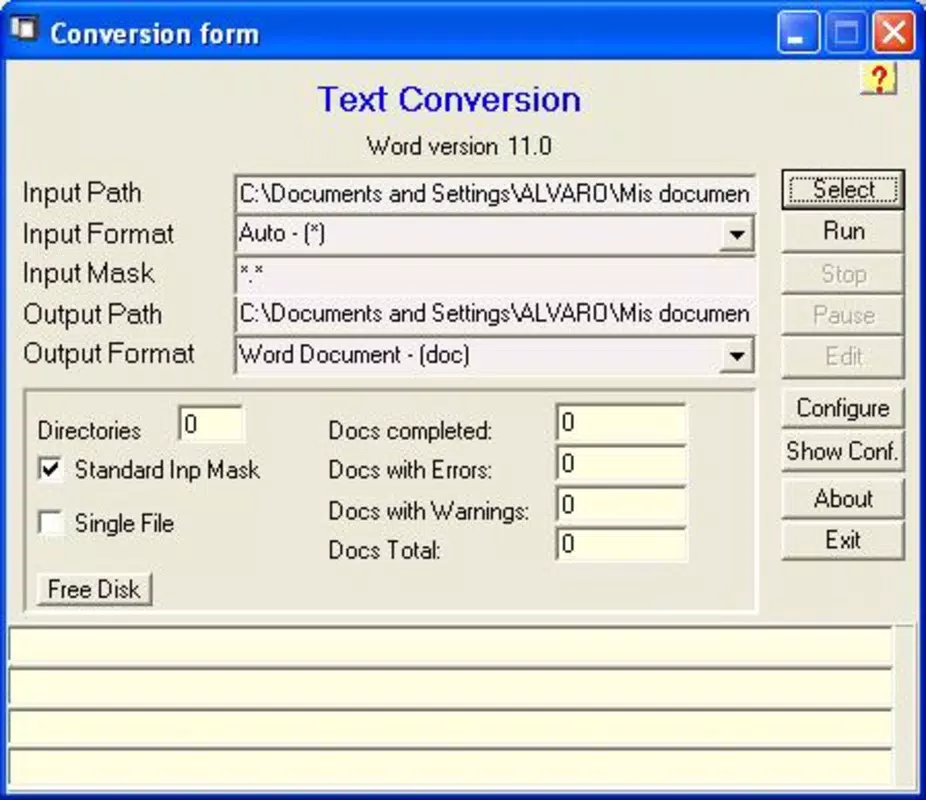
- Intuitive User Interface: The app features a clean, user-friendly interface that accommodates users of all technical skill levels. Navigation is straightforward, allowing for quick access to conversion tools and settings.
For example, a student preparing a research paper might use WordConvs to convert a series of legacy TXT and RFT files into a standardized DOCX format for submission. Similarly, a business professional could batch-convert a folder of WPS and DOT files into PDFs for sharing with clients. The ability to access hidden files may also assist in recovering important documents from backup folders or system directories.
Interface, UX & Performance
WordConvs presents a clean, minimalist interface designed to prioritize functionality over visual complexity. The layout emphasizes ease of access to core conversion tools, with clearly labeled buttons and a logical flow from file selection to output format choice. Navigation is consistent across screens, minimizing user confusion and reducing the learning curve for new users.
The app’s responsiveness appears to be optimized for standard Android devices, though specific performance metrics were not disclosed by the developer. Users can expect smooth operation during single and batch conversions, particularly given the app’s relatively small size of 10.5 MB. Although the developer did not list formal performance metrics, the app’s lightweight design suggests efficient memory usage and minimal impact on device battery life.
Stability is likely maintained through years of updates, considering the app’s release date in 2007. However, compatibility with modern Android versions was not fully disclosed. Users should ensure their device meets the minimum OS requirements, though these were not specified in the provided data. Overall, the app’s design reflects a focus on usability and reliability, making it accessible to both novice and experienced users.
Platform Compatibility & Technical Requirements
WordConvs is available exclusively on the Android platform. The current version is 1.1.2, with a file size of 10.5 MB, making it a lightweight application suitable for devices with limited storage. The app is currently free to download and use, with no in-app purchases or subscription fees reported.
Although the developer did not specify minimum OS requirements or compatibility details for newer Android versions, the app’s long-standing presence suggests it has been adapted over time to maintain functionality across evolving system updates. Users should verify compatibility with their specific device model and Android version before installation. The absence of detailed technical specifications means that advanced users may need to test the app on their device to confirm full functionality.
Pros and Cons
Pros
- Supports over 15 input formats, enhancing cross-platform document compatibility.
- Enables batch conversions, significantly improving efficiency for large-scale tasks.
- Allows access to hidden files, aiding in document recovery and organization.
- Operates without requiring a text editor, simplifying the conversion workflow.
- Lightweight design with a small file size, ideal for low-storage devices.
Cons
- Specific OS requirements were not listed, limiting clarity on compatibility.
- Developer background and company details were not provided.
- Performance benchmarks and real-world speed data were not disclosed.
- Only available on Android, with no information on iOS or other platforms.
- No visible update history or changelog was shared with users.
FAQ
Is WordConvs safe to download and install?
Yes, the app is free and available through official Android channels. Users should ensure they download from trusted sources to maintain device security.
Can I convert multiple files at once?
Yes, WordConvs supports batch conversions, allowing users to process several files simultaneously without opening each one individually.
Does WordConvs work with hidden files?
Yes, the app can access and convert files that are typically hidden within system folders, which may be useful for retrieving archived or system-generated documents.
Do I need a text editor to use WordConvs?
No, the app enables document conversion directly without launching a separate text editor, streamlining the workflow.
Is WordConvs available on iOS?
The developer did not provide information on iOS compatibility. The app is currently confirmed for Android only.
Final Thoughts
WordConvs stands out as a dependable, lightweight tool for users seeking efficient text and document conversion on Android. Its ability to handle multiple formats, support batch processing, and access hidden files makes it a practical choice for students, professionals, and anyone managing diverse document types. The app’s editor-free operation and intuitive interface further enhance its usability, particularly for those who value speed and simplicity.
While some technical details remain undisclosed, the app’s long-standing presence and consistent functionality suggest reliability over time. For users who need a secure, free, and effective solution for converting documents on the go, WordConvs delivers strong value. With its focus on core functionality and minimal overhead, it remains a relevant utility in the mobile productivity landscape.
Download WordConvs now


